
Cuando contratas un operador para tener fibra o Internet en casa, acude habitualmente un técnico a realizar la instalación completa de los aparatos y el router y ponerlo en marcha para que puedas conectarte y navegar con facilidad y sin ningún problema. Aun así, es posible que haya algunos pequeños ajustes que puedas hacer tú o algunas preguntas que puedan surgir sobre el mantenimiento. Si quieres saber cómo configurar el WiFi en casa o en tu negocio, repasamos algunas cuestiones fundamentales o respondemos algunas preguntas para que te manejes con facilidad.
Aunque un técnico pueda acudir a casa a realizar la instalación completa o en caso de avería, hay cosas que puedes hacer tú mismo. Por ejemplo, crear redes WiFi para invitados, reiniciar o resetear el router, abrir los puertos, etc. Todo ello podrás hacerlo y podrás configurar el WiFi en casa sin ayuda siempre que lo necesites.
Pese a que es habitual pensar que todo lo anterior únicamente pueden ahcerlo todos aquellos que tengan conocimientos avanzados en la materia, la realidad es bastante diferente. De hecho, muchas de las opciones que hemos mencionado están en el menú de configuración de nuestro router y son muy accesibles. Te contamos todo lo que tienes que saber al respecto para que puedas ser lo más autónomo posible al respecto.
Equipo necesario para configurar WiFi
Podremos disfrutar de WiFi en casa en poco tiempo después de comprar y conectar los siguientes productos. Si contratamos la línea con nuestro operador, como es bastante habitual que ocurra, es importante que conozcamos que muchos de los productos que te vamos a nombrar a continuacuón los aportará el propio operador. Por lo que no tenemos que hacer la compra de manera paralela, no obstante, en cualquier caso te los nombramos a continuación:
- Módem
Este es un dispositivo receptor que convierte los datos recopilados a través de líneas telefónicas, cables de fibra óptica o cables coaxiales en una señal digital. El módem entrega esta señal digital al router, que envía la información a los dispositivos digitales inalámbricos. Aunque nuestro operador nos dará un módem cuando contratemos el servicio de Internet con ellos, es posible que queramos comprar uno propio. Si compramos uno propio, no tendremos que pagar una tarifa mensual y podrá pasar a ser nuestro.
- Router
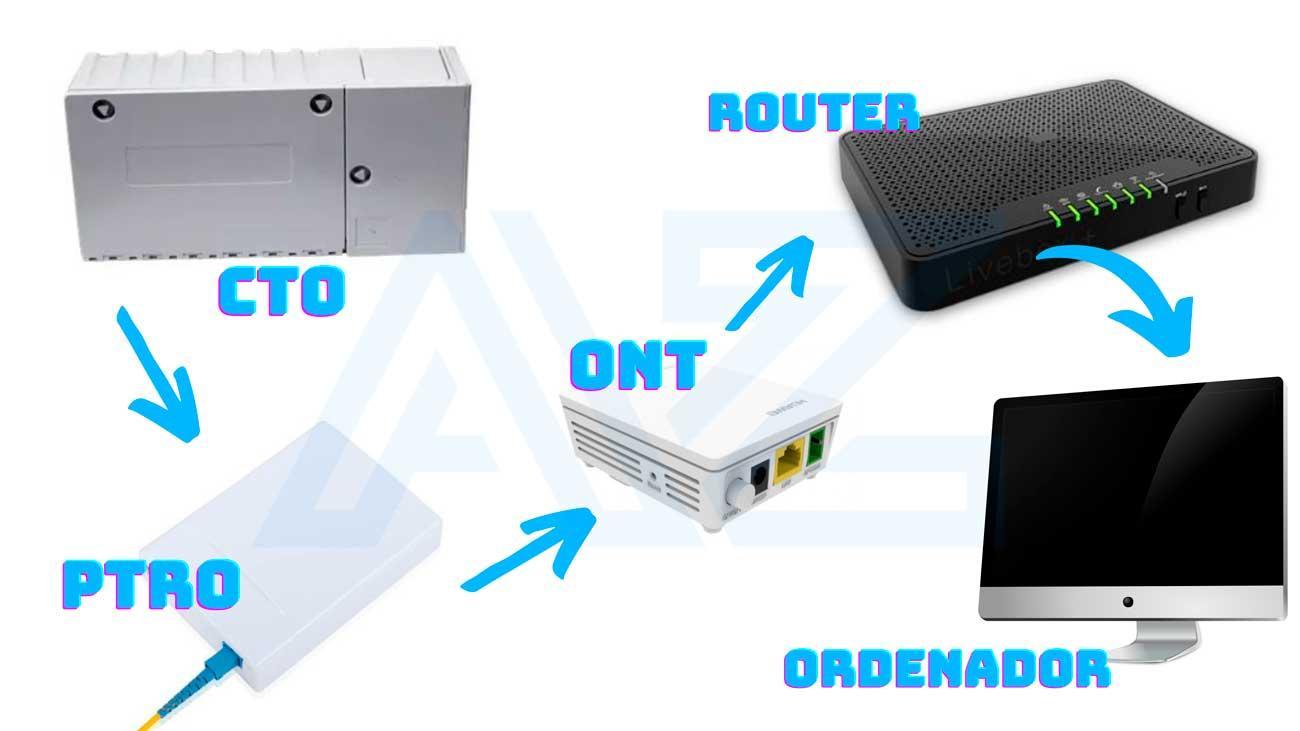
El router es una pieza de hardware que ayuda a establecer la red WiFi de casa al permitir que los dispositivos inalámbricos accedan a Internet. También cuenta con un software llamado firmware que ayuda a mantener segura la red. De esta forma, una vez el módem ha traducido la señal, el router la difunde o distribuye para que llegue a todos los dispositivos.
Como detalle, cabe agregar que actualmente los modelos más modernos incluyen el módem en el router (en un mismo dispositivo físico, si bien las funciones de ambos elementos siguen siendo las mismas).
- La ONT y la CTO
La ONT sirve para conectar nuestro hogar (o el lugar en que instalemos una nueva conexión) al cable de fibra óptica. La CTO es la caja de abonados a la que se conecta la fibra de cada hogar. Existen diferentes situaciones y no siempre necesitaremos una ONT en nuestra instalación. Si escogemos un operador que cuenta con CTO en nuestro edificio no necesitaremos instalar una ONT, pero si nuestro edificio únicamente cuenta con una CTO de otra compañía diferente a la que queremos contratar, tendremos que instalar la ONT.
- Cable de ethernet
El cable Ethernet es un cable grueso que transporta señales de alta velocidad. Este cable puede proporcionar acceso directo a Internet a otros dispositivos con cable. Sirve, por ejemplo para conectar cualquier dispositivo directamente al router. Además, si contamos con un repetidor o con otra salida de Ethernet en alguna parte de nuestro hogar, podemos conectar otros dispositivos con este cable, por ejemplo, una televisión inteligente o una consola.
- Dispositivo inalámbrico
Al configurar Internet WiFi para casa, necesitaremos un dispositivo inalámbrico para conectarnos. Puede ser un teléfono móvil, una tablet, un ordenador portátil, u otros dispositivos domésticos inteligentes modernos. Cuando usemos WiFi en casa, estaremos conectados de una habitación a otra sin necesidad de cables.
Cómo entrar al router
Lo primero que debes saber es cómo entrar al router desde tu ordenador o cualquier dispositivo que tengas en casa. Una vez que estés dentro, podrás realizar todo tipo de tareas como cambiar la contraseña, ver los dispositivos conectados o reiniciar. Para poder acceder al menú del router, pese a que cada uno tiene sus propios menús y los accesos a estos pueden variar sustancialmente, será necesario realizar los mismos pasos previos.
El menú del router se encuentra en la red, es decir vamos a tener que acceder a él a través de nuestro navegador. Para poder hacerlo primero tenemos que saber cuál es la dirección IP de nuestro router WiFi, y para ello tenemos muchas formas de comprobarlo. Una de las más sencillas es abrir una ventana de CMD o símbolo del sistema. Lo haremos yendo hasta la barra de búsqueda del menú de inicio de Windows y teclearemos “Símbolo” o sencillamente “CMD”, y ya nos aparecerá la clásica ventana de fondo negro y letras blancas que tanto nos recuerda a MS-DOS. Aquí introducimos el comando “ipconfig” y pulsamos intro. Veremos que hay varios resultados pero nosotros nos tenemos que fijar únicamente en el que indica “Puerta de enlace predeterminada”. Seguramente sea el valor 192.168.1.1 o 192.168.0.1. Si tienes apuntados estos números en ningún sitio para probar con alguno de estos directamente, siempre es bueno saber cómo obtenerlos.
Una vez tengamos clara la dirección del router abrimos el navegador que queramos, y en la barra de direcciones donde introducimos las URL pegamos la dirección de nuestro router. En seguida se nos abrirá el portal de acceso a nuestro router que nos pedirá el usuario y contraseña. Ojo, no confundir con el SSID de nuestra conexión a internet (por ejemplo Vodafone098C) y con la contraseña de acceso. En resumen:
- Abre tu navegador.
- Escribe en la dirección del router.
- Inicia sesión.
En la mayoría de los casos, todos los router vienen configurados como “admin” como usuarios, si no lo has cambiado. En el caso concreto de Vodafone el nombre de usuario para acceder al router suele ser precisamente “Vodafone”, y la contraseña de acceso que encontrarás en una pegatina detrás del router, es mucho más corta que la clave de red. Eso sí, siempre que la hayas dejado configurada por defecto y no la hayas cambiado.
Una vez dentro ya podrás acceder a las diferentes opciones de configuración de la red WiFi y ajustarlas a tu gusto. Cada router tiene su propia interfaz de configuración en la parte de administración, por lo que a continuación mostraremos instrucciones y recomendaciones generales para cualquier equipo que deberás buscar en la configuración del tuyo.
Configurar la contraseña
Puedes cambiar la contraseña siempre que quieras, para mejorar tu seguridad o para recordarla con mayor facilidad. Podrás hacerlo accediendo a la configuración del WiFi desde tu navegador y acceder a la configuración del mismo.
- Abre tu navegador
- Escribe 192.168.1.1 (o el IP correspondiente a tu router)
- Accede con tus datos a tu router y usa la contraseña para entrar
- Ve a Administración
- Pulsa en “Configuración”
- Haz clic en “Parámetros de seguridad”
- Elige la opción de cifrado WPA2-PSK [AES]
- Elige una nueva contraseña
- Guarda
La ruta anterior puede variar según el router que tengas o el operador. Pero, en cualquier caso, siempre podrás acceder al IP (sea este u otro que hayas elegido) desde el navegador que tengas en tu ordenador y acceder a la configuración para cambiar los parámetros de seguridad que haya configurados por defecto. En algunos casos, puede ser algo más sencillo:
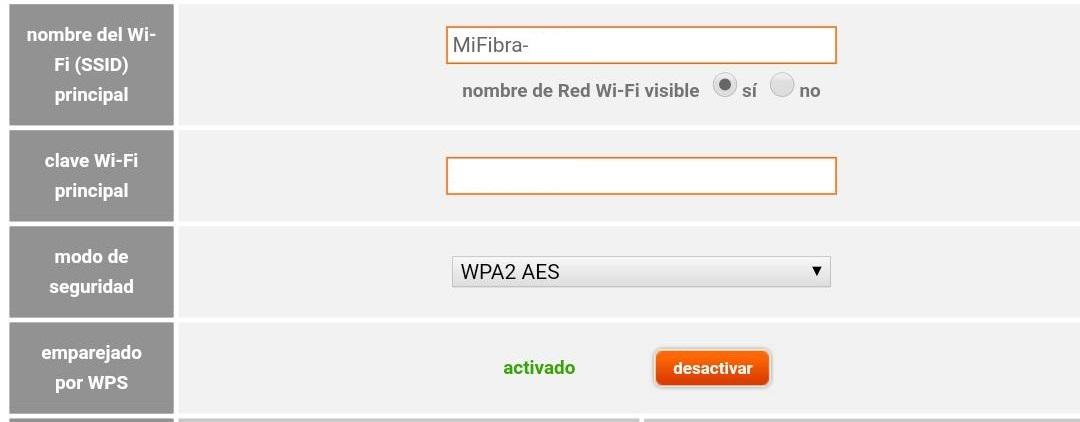
Puedes cambiar el nombre y la contraseña. Simplemente accede al apartado correspondiente (puede variar según el modelo que tengas)
- Ve a 192.168.1.1
- Ve a Wi-Fi
- Modifica nombre del Wi-Fi (SSDI)
- Modifica la contraseña
- Elige modo de seguridad WPA2 AES
- Guarda los cambios
Es aconsejable que elijas una contraseña suficientemente segura para que ningún vecino ni ciberdelincuente pueda acceder a tu router sin permiso. Cuanto más compleja sea, mejor. Puedes incluir números, símbolos, mayúsculas o minúsculas. Eso sí, recuerda que siempre que quieras configurar el WiFi o conectarte de un nuevo dispositivo, tendrás que usar la nueva contraseña.
Compartir contraseña con otras personas
Si van visitas a casa, podrán pedirte la contraseña del WiFi para conectarte. Puedes darle la que tienes creada y dictar todos y cada uno de sus caracteres. Pero esto no siempre es cómodo ni fácil y podrá llevarte un buen rato. Hay varias opciones para compartir WiFi con tus invitados sin tener que dictar o copiar tu contraseña. Es importante tener en cuenta que, especialmente en el caso de los routers más modernos, en muchos de ellos viene en una pegatina la contraseña por defecto del mismo. Por lo que únicamente vamos a tener que ir al dispotivio en cuestión para conocer la información. Sin embargo, si la cambiamos, tendremos que apostar por alguna de las opciones que te vamos a mencionar a posteriori.
Botón WPS
La primera opción es que pulses el botón WPS que puede que haya en tu router. Lo que hace este botón es que la persona que está intentando conectarse no tenga que escribir la contraseña sino un código PIN mucho más simple para acceder. Automáticamente se conectará a tu red inalámbrica sin saber la clave. Es una opción muy práctica, sobre todo para los dispositivos en los que es imposible escribir una contraseña, como una impresora sin embargo, debes tener en cuenta que no se encuentra presente en todos los modelos, así que si no está tendrás que optar por otras opciones.
Además, hay que tener cuidado al escoger esta opción porque de esta forma abrimos el WiFi y cualquier usuario (incluyendo esos vecinos que siempre están buscando Internet gratis) podrán conectarse a tu red.
Algunos fabricantes tienen, en lugar de WPS en el botón físico, las denominaciones Wi-Fi Simple Config, Control de reproducción (PBC), Push ‘n’ Connect o Quick Secure Setup (QSS). Comprueba que tu dispositivo y router son compatibles con esta función, ya que en caso contrario no podrás usarla.
Crear un código QR
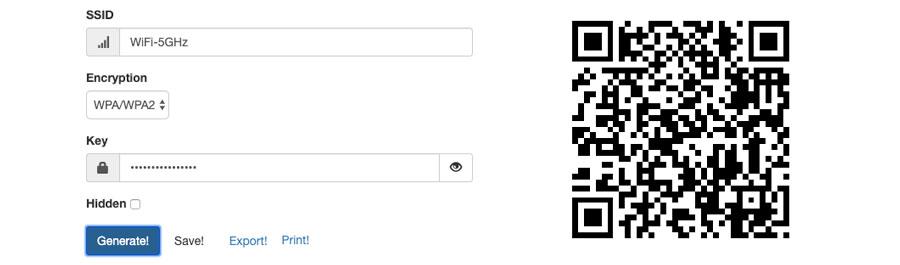
La segunda opción es crear un código QR para compartir WiFi que pueda escanearse para compartir nuestra red de forma fácil y sencilla. Sólo tendrás que usar un programa adecuado o una aplicación para móviles que nos permite generar un código QR con lo que queramos. En este caso, un código para conectarse a la red inalámbrica. Puede que tu router ya cuente con uno que tendrás que mostrarle para que se conecte, aunque no es lo más habitual.
- Usa una aplicación para crear códigos QR
- Crea el código QR especificando que se trata de una red
- Imprime el código para cuando haya visita o guárdalo en tu galería
- Di a tu invitado que abra su lector habitual de QR
- Escanea el código
- Ya estará conectado sin necesidad de saber la contraseña
Crear redes WiFi para invitados
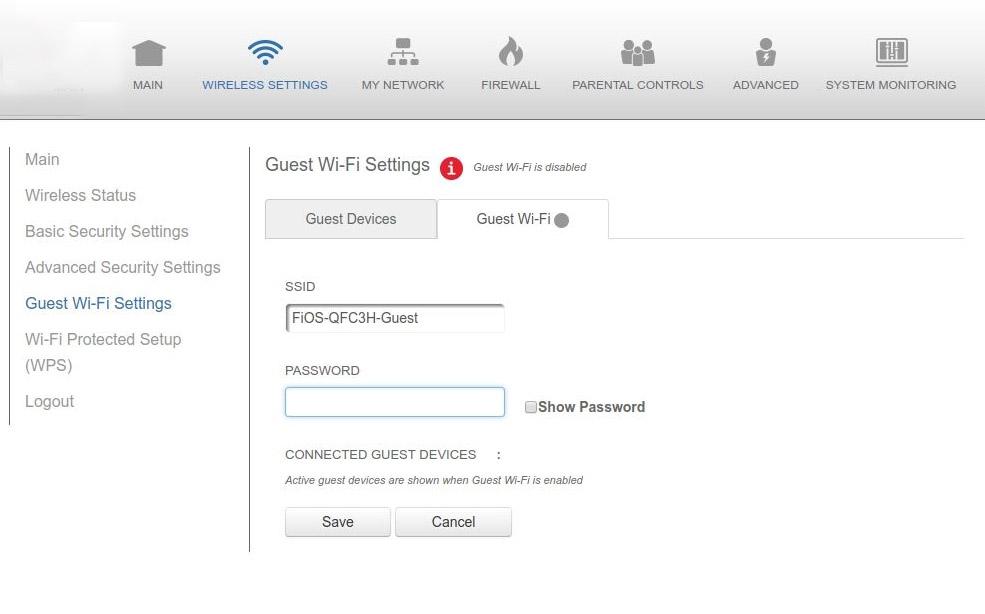
Si no quieres compartir tu contraseña con tus invitados, puedes crear una red WiFi exclusiva para invitados, para cuando alguien llegue a casa. Es perfecto para cuando va a haber demasiada gente en casa (en Navidad, por ejemplo) y no quieres que sepan tu contraseña o que puedas tener problemas de seguridad en el futuro. Es rápido y muy básico.
Accede al navegador de tu ordenador y accede a la ruta IP de tu router (normalmente 192.168.1.1 si no lo has cambiado), desde aquí podrás crear la red de invitados.
- Ve a 192.168.1.1 en tu navegador
- Accede con tus datos a tu router (usuario y contraseña)
- Pulsa en la opción “Crear una nueva red WiFi”
- Elige y haz clic en “Wireless Guest”
- Se habilitará una red en la que podrás elegir los parámetros que quieras
A diferencia de tu red habitual, podrás aislar dispositivos y podrás crear una contraseña fácilmente recordable para que tus invitados accedan sin preguntarte continuamente o sin equivocarse. Una vez que se vayan, podrás eliminarla siguiendo los pasos anteriores.
Ocultar tu red WiFi
Establecer una contraseña lo suficientemente fuerte y segura permite proteger el acceso a cualquier intruso en nuestra red, sin embargo, hay otros ajustes que tienen que ver con la propia seguridad de nuestra conexión. Aunque no se puede considerar como una medida de seguridad real, hay algo muy sencillo de hacer y que nos puede ayudar a la hora de proteger nuestra red. Nos referimos al hecho de poder ocultar nuestra WiFi para que, los dispositivos que realicen una búsqueda de redes inalámbricas a su alcance, no puedan verla.
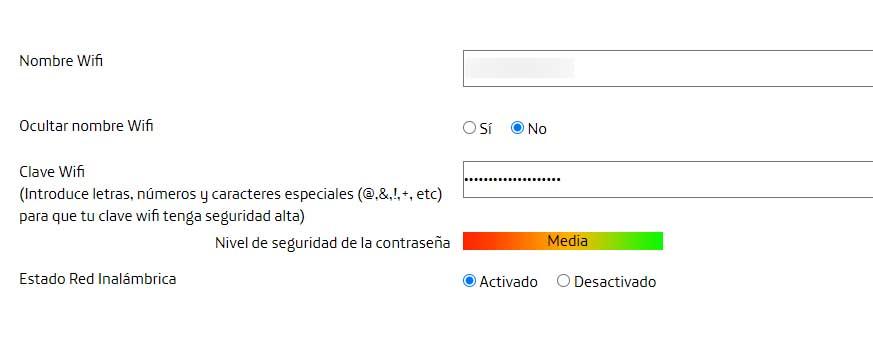
Esta opción la solemos encontrar dentro del apartado de información de nuestra red, donde se muestra el SSID, contraseña, etc. Ahí es donde debemos buscar la opción o ajuste que nos permite indicar que nuestra WiFi estará oculta y no será visible para ninguno de los dispositivos que se encuentren a su alcance.
Controlar intrusos
En la configuración por defecto del router, lo normal es que el equipo permite conectarse a cualquier dispositivo que conozca la contraseña de acceso. Sin embargo, si sospechamos que alguien nos puede estar robando el WiFi o simplemente queremos evitarlo permitiendo únicamente que los dispositivos de nuestro hogar sean los que se puedan conectar a nuestra red, podemos realizar un filtrado de MAC.
La dirección MAC es como la matrícula de cada dispositivo conectado a un router. Por lo tanto, es la manera de identificarlos. Utilizando esta información, puedes hacer un filtrado por MAC para controlar los dispositivos que se conectan a tu red WiFi.
Dentro de la configuración del router, en opciones avanzadas, tenemos esta herramienta que nos permite administrar los dispositivos que queremos que se conecten a nuestra red inalámbrica, bloqueando el resto de dispositivos. Lo único que hay que hacer es crear una lista con las direcciones MAC de los equipos que queramos dar acceso. Una vez hecha la lista, el router bloqueará a todos aquellos dispositivos que no se encuentren en ella e intenten acceder a la red WiFi.
Además, esta lista la podrás modificar siempre que quieras, añadiendo o eliminando despositivos cuando creas necesario. Es una herramienta muy interesante y que puedes tener en cuenta si sospechas que hay intrusos o que te están robando el WiFi y puedes configurarlo sin tener demasiados conocimientos sobre administración de redes.
Debes tener en cuenta que, es una herramienta que se utiliza para proteger de intrusos las redes WiFi, ya que se presupone que los equipos que están conectados por cable al router, tienen permiso para hacerlo y de no ser así, bastará con desconectar el cable de red para que deje de tener acceso a Internet.
Actualizar firmware
Otra de las recomendaciones a la hora de configurar nuestra red inalámbrica es actualizar el firmware del router. Las actualizaciones permiten corregir fallos o errores en el dispositivo con el objetivo de mejorar la seguridad y el funcionamiento del mismo, además de poder añadir ciertas funciones. Por lo tanto, es conveniente comprobar si hay actualizaciones disponibles nada más hacer la instalación del mismo y de manera periódica.
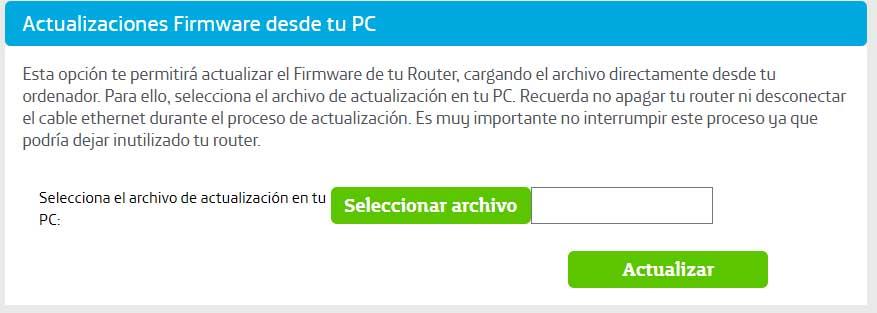
Esta opción suele aparecer entre las opciones principales del menú de configuración de nuestro router. Lo único que tenemos que hacer es buscar esta opción y a continuación, tendremos la opción de buscar actualizaciones disponibles o bien seleccionar nosotros mismos el archivo de actualización en el caso de que hayamos descargado la última versión desde la web del fabricante. Es recomendable comprobar si existe alguna nueva actualización con frecuencia para mantener la seguridad máxima en nuestros equipos y dispositivos.
Reiniciar el router
Reiniciar el router es otra de las cosas que puedes hacer sin ayuda para forzar algunos procesos y que funcione mejor. Para reiniciar el router, tienes que esperar algunos segundos para que todos los procesos se apaguen al completo y los circuitos dejen de funcionar. Puedes reiniciarlo desde el propio aparato o accediendo a la configuración del mismo desde tu navegador y a la dirección IP.
Desde el propio aparato
Pulsa el botón de la parte trasera para apagarlo, desenchufa los cables y espera unos veinte segundos. Vuelve a enchufarlo, enciende de nuevo el dispositivo y empezarán a encenderse las luces. Pasados unos minutos, podrás probar de nuevo. Es la opción más sencilla que te puedes encontrar cuando necesitas hacer esta función.
Es recomendable hacerlo al menos una vez al mes o con cierta frecuencia para mejorar nuestra conexión a Internet, aunque no obligatorio, aunque suponga tener que esperar a que vuelva a conectarse correctamente.
Desde la configuración
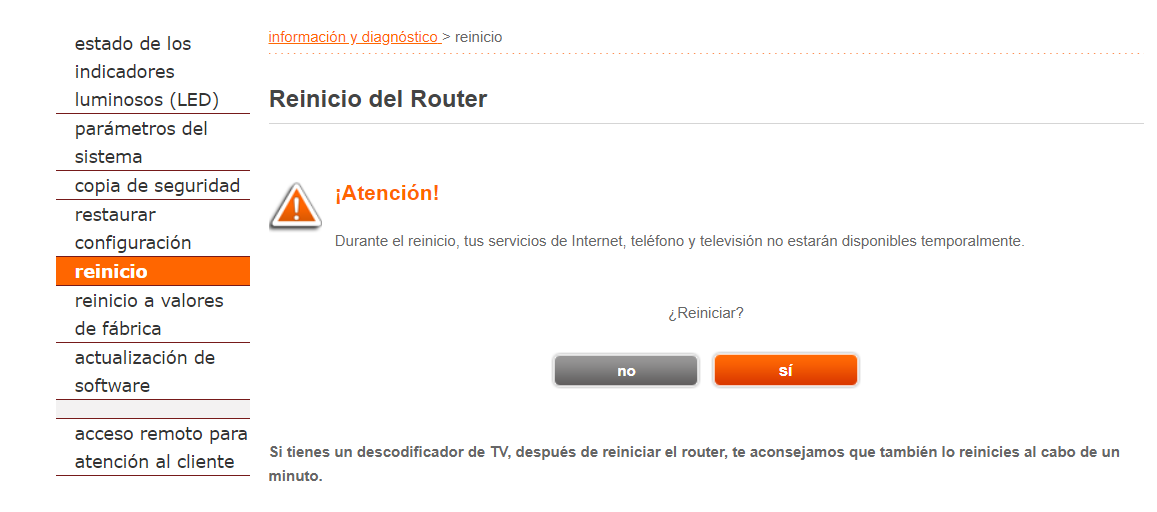
También puedes acceder desde el navegador.
- Ve a 192.168.1.1
- Accede con tus datos personales
- Ve a Administración y a Configuración
- Pulsa en Reiniciar
- Espera unos minutos
- Prueba de nuevo tu conexión a Internet
Restablecer el router
Otra opción es restablecer el router, diferente a reiniciar. Esto restaura de fábrica los valores del dispositivo y perderás la clave de acceso o el nombre de la red, así como el firmware actualizado que tengas. Todo volverá a estar como al principio y tendrás que volver a configurar el WiFi si quieres cambiar tu nombre o contraseña.
Desde el aparato
- Busca el orificio en la parte trasera
- Introduce una punta de lápiz o bolígrafo
- Mantén pulsado durante unos 10 segundos
- Las luces se iluminarán y se apagarán
- El router empezará a restablecerse
Desde la configuración
Puedes hacerlo sin necesidad de tocar el aparato ni buscar algo afilado. Tendrás que tener acceso a un navegador e ir a 192.168.1.1.
- Ve a 192.168.1.1
- Accede con tus datos personales
- Ve a Administración y a Configuración
- Pulsa en Restablecer
- Espera unos minutos
- Volverá a la configuración de fábrica
¿Qué canal utilizar?
Para asegurar una conexión WiFi óptima tendremos que asegurarnos de escoger la frecuencia adecuada. Algunos modelos de router tienen integrado un analizador de espectro que comprueba los canales y busca el menos saturado, configurando cada vez una red en un canal diferente.
Eso sí, todos los routers permiten una selección manual del canal para escoger el menor saturado. Si nuestro router y los dispositivos que queramos soportan la tecnología de 5GHz, es aconsejable escogerla en lugar de la de 2.4GHz, ya que está menos saturada de dispositivos y ofrece mayor cobertura y estabilidad. Aunque también hay que tener en cuenta la compatibilidad de los dispositivos y la distribución de nuestro hogar, entre otros aspectos.
Si aun así seguimos queriendo comprobar el canal de forma manual, hay aplicaciones para móviles, como Wifi Analyzer, que nos ofrece una gráfica con las redes a nuestro alcance, ordenadas según su canal de emisión. Lo ideal es escoger, siempre que sea posible, el menos transitado para recibir una conexión más plena.
Configurar el servidor DHCP
El servidor DHCP se encarga automáticamente de dar una dirección IP de un rango especificado a cada dispositivo que se conecta junto a la máscara de subred, puerta de enlace y servidores DNS.
Tanto los puntos de acceso como los sistemas operativos estarán configurados para obtener una IP a través de este servidor siendo cada vez una diferente dentro del rango, sin embargo, podemos configurarlo de manera que asociemos una dirección MAC a una IP fija, quien siempre obtendrá dicha IP automáticamente desde este servidor. Es necesario tener bien configurado este apartado para no tener problemas a la hora de abrir los puertos del router.

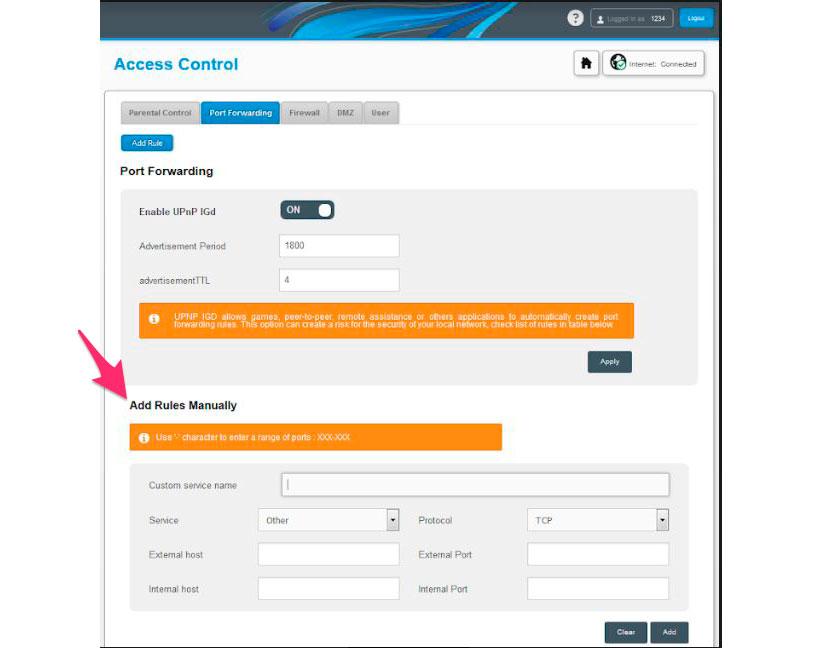
Abrir puertos del router Wifi
Los puertos se utilizan para conectar diferentes aplicaciones con sus servidores remotos para funcionar mejor. Esto es especialmente necesario a la hora de utilizar clientes torrent o juegos online. También tenemos que tener en cuenta que hacerlo puede hacer nuestra conexión más vulnerable a ataques.
Cada aplicación utiliza un puerto único comprendido entre 0 y 65535. Los primeros 1024 están reservados para aplicaciones elementales y no deben utilizarse (por ejemplo, el puert0 80 es el HTTP, e21 FTP, etc). Para que funcione bien, tendremos que abrir en nuestro router los puertos que utilice el programa en cuestión para vincular cada puerto a la dirección IP de nuestro PC, aunque debemos tener en cuenta que si utilizamos un servidor DHCP esta puede variar.
Cambia el nombre de la red WiFi
Una vez dentro de los ajustes de tu router lo primero que deberías hacer es cambiar el nombre de la red WiFi. Para hacer esto debes pinchar en el apartado WiFi de la configuración del router y una vez dentro buscar el nombre de la red. Estará en un apartado llamado Nombre de la red, SSID o similar. Cambia el nombre que tenga establecido por defecto e introduce el nombre que quieras utilizar y pincha sobre el botón de guardar.
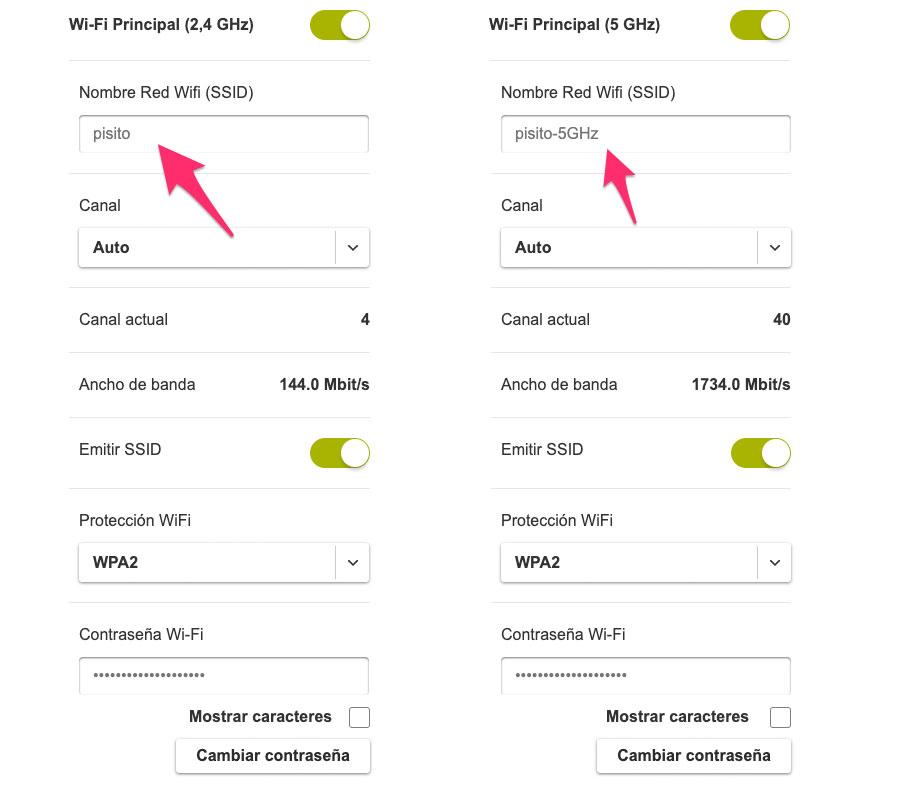
Es recomendable que pongas un nombre que te resulte fácil de recordar, así no tendrás dudas a la hora de conectar tus dispositivos. Si tu router emite dos redes WiFi (2,4 y 5 GHz) cambia el nombre de las dos. Es muy recomendable que el nombre sea el mismo en ambas redes, así en caso de que el router disponga de Smart Connect ambas redes se unificarán en un único SSDI y los dispositivos que se conecten utilizarán la banda más adecuada en cada momento.
¿Es importante cambiar el nombre habitualmente? La realidad es que no tiene sentido hacerlo en la mayoría de los casos. Es habitual cambiar el nombre de la conexión cuando hemos detectado a algún intruso, lo hemos echado, y queremos reducir las posibilidades de que se vuelva a conectar. Sin embargo, únicamente va a confundir al intruso cuando se conecte, pero no es una medida de seguridad como tal. Por lo que no es necesario que cambiemos el nombre del router de manera periódica, ni nada similar.
Desactiva WPS
El sistema WPS (WiFi Protect Setup) nació como un método de facilitar la conexión de nuevos dispositivos a la red sin necesidad de introducir la contraseña.
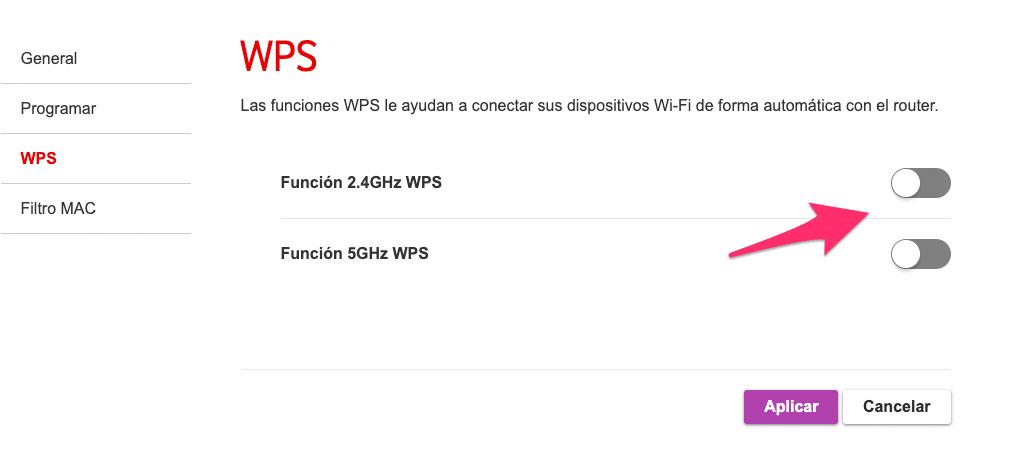
Su funcionamiento es sencillo. Basta con pulsar un botón en el router para que la red WiFi quede abierta a nuevas conexiones de dispositivos compatibles con WPS durante 60 segundos. En el mejor de los casos los usuarios tendrán que introducir un PIN de 8 dígitos para confirmar que están autorizados a acceder al dispositivo.
El problema de este sistema es que no es seguro. Muchos routers no establecen límites de intentos fallidos de acceso con PIN, por lo que en pocas horas un atacante pueda acceder a la red sin autorización. Además, las aplicaciones que se utilizan para desencriptar contraseñas WPA o WPA2 también suelen ser efectivos para obtener los PIN de los sistemas WPS. Teniendo esto en cuenta, la recomendación es que accedas a la configuración de tu router y desactives por completo esta funcionalidad. Así mejorarás la seguridad general de tu red WiFi.
Programar router
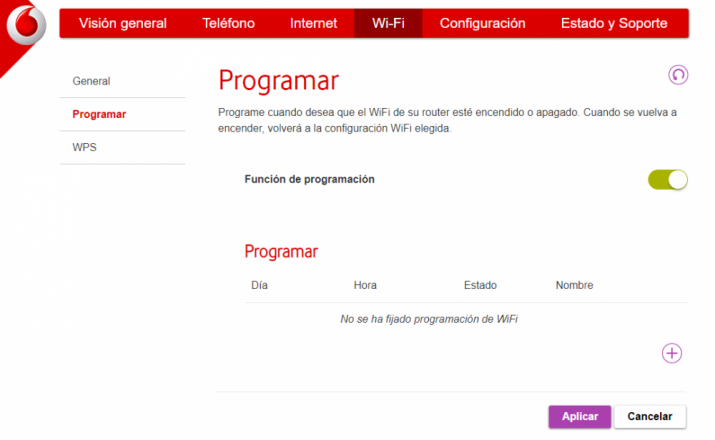
Por si no lo sabes, algunos routers disponen de la función “Programar” a la que puedes acceder también a través del menú de configuración del router. Se trata de una característica mediante la cual vamos a poder programar cuándo queremos que el WiFi de nuestro router esté encendido, o por el contrario se apague y no emita señal alguna.
Una vez activemos la casilla «Función de programación», que por defecto está desactivada, podremos establecer los siguientes parámetros:
- Periodo de tiempo: Podremos programar horarios para todos los días, cada día laborable, fin de semana completo, y días individuales.
- Estado: Activado o desactivado.
- Nombre: El que le queramos poner. Por ejemplo: Fin de semana, viaje, trabajo, etc.
- Hora: Desde y Hasta, u hora de inicio y hora de finalización.
Una vez establecidos todos los parámetros le damos a guardar, y para finalizar hacemos clic en el botón «aplicar». Si todavía no hemo puesto nada nos aparecerá el aviso «No se ha fijado programación de WiFi».
Podemos crear todos los planes que queramos, y así tener uno para fin de semana, otro entre semana y que por la noche se apague, otro para viajes, etc. Además, cuando se vuelva a encender el router tras un periodo de desconexión, retomará su configuración habitual, y no tendremos que hacer absolutamente nada. Si en algún momento te cansas de los horarios que has establecido en Programar, no tienes más que quitarlos o editarlos a tu gusto.
Aprovecha el puerto USB
La mayoría de routers incorporan un puerto USB al que podemos dar diferentes usos. Debemos tener en cuenta que estas funciones no están presentes en todos los modelos, con lo que, en primer lugar, debemos revisar si nuestro dispositivo incluye estas configuraciones para poder aprovecharlo.
Puedes usar el puerto USB del router para cargar otros dispositivos sin necesidad de enchufarlos a la corriente de tu hogar. Puedes usarlo para cargar dispositivos que consuman poco si tienes el resto de alternativas ocupadas, aunque la velocidad de carga no será muy elevada. Durante la Navidad, por ejemplo, es muy habitual que muchos usuarios conectes su árbol de Navidad al router, si están próximos, para evitar tener que dedicar un enchufe a ello. Aunque, como es obvio, dependerá de si tenemos conexión con USB en nuestras luces de Navidad o no.
Si tu dispositivo resulta compatible con esta funcionalidad, también podrás usar el USB del router para conectar tu impresora sin WiFi y convertirla en un dispositivo nuevo con acceso a Internet.
Finalmente, también puedes usar tu router para compartir diferentes archivos con un USB o un disco duro. Si bien es mucho más cómodo realizar este proceso desde tu PC, es interesante valorar esta alternativa por si en algún momento no dispones de otra opción. Dependerá de tu router, pero en general tendrás que hacer los archivos visibles o bien desde las opciones de redes de tu sistema operativo o bien por FTP.